
PELUANG88 runs on the same lobby platform as most of the Syarikat Cuci brands, and like its sister brands it puts an app download banner at the very top of the screen. What is different here is the promotion page: it carries no app credit card, while several brands on the identical platform do. This page covers the download route, how an Android install works in general, the risks of an APK from anywhere else, and what the app opens into.
Open the brand in a phone browser and the first strip you see is the app banner: the brand name followed by App, the line Download And Play Now, and a Download button beside it. The same route appears again in the side menu as Download App, so you can reach it without scrolling back to the top.
That button is the download route. This guide does not print any address or alternative link for the brand, and you do not need one: reach the lobby by the brand name, sign in, and the banner is on the home screen. The black and gold skin and the Syabas99 Partnership badge in the header are how you confirm you are in the right lobby before you tap anything. If you want the wider picture first, the brand page covers its lobby and promotions in detail.
Version numbers, file size and release notes are not published next to the banner. Treat the download as a wrapper for the lobby rather than a separately documented product.
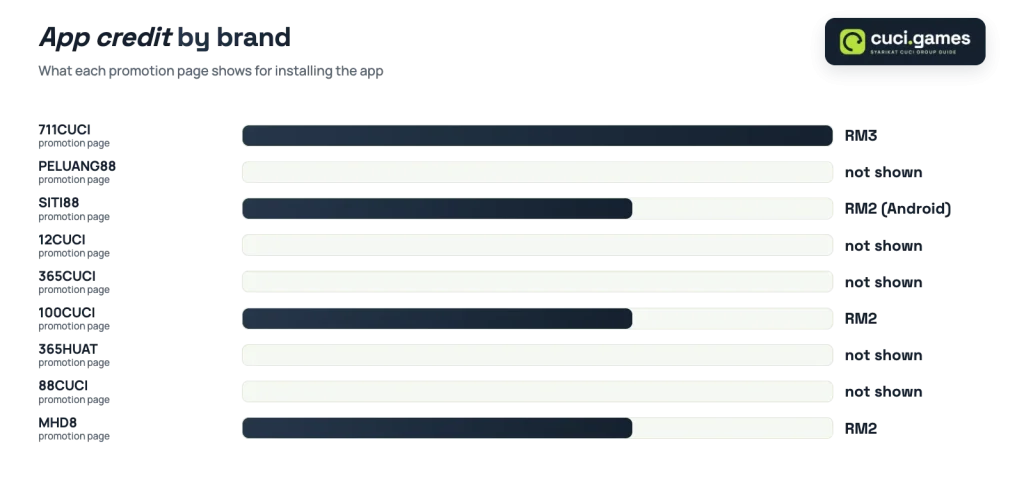
Several brands on this platform pay a small credit for installing the app. PELUANG88 is not one of them, so do not expect a bonus to land after the install.
| Brand | App credit shown on its promotion page |
|---|---|
| PELUANG88 | none shown |
| 711CUCI | RM3 |
| 100CUCI | RM2 |
| SITI88 | RM2 (Android app) |
| MHD8 | RM2 |
The brand still shows its own promotion set, including Free Credit 365 at RM2, a 10% weekly commission and a 2 day 6% rebate card. The app simply is not one of the rewarded actions here. Promotions move around often, so the figures above are only as current as the date in the comparison table, which also covers app credits across the group brand by brand.
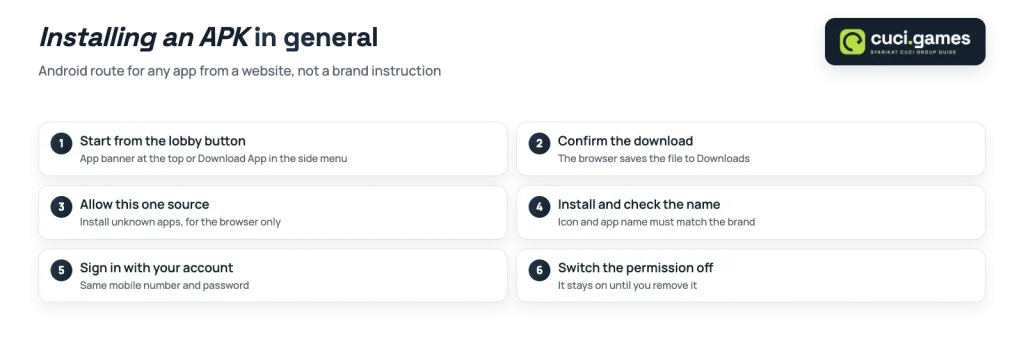
The brand does not publish its install steps, so the route below is the general Android sequence for any sideloaded app file in Malaysia. It is not a brand instruction, and nothing in it should override what the lobby itself tells you on screen.
Updates work the same way as the first install on sideloaded apps: in general you download the newer file and install over the old one. If the app stops loading after a platform change, the lobby in your browser is the fallback.
Search for a brand plus the word apk and you will find file hosts, forums and review pages offering a download. None of them are the brand. A repackaged APK can be modified before it reaches you, and an install screen that asks for permissions unrelated to a casino lobby is the clearest warning sign you will get.
Two habits remove most of the risk. Download only from the button inside the lobby you reached by brand name, and never type your login into a screen you did not arrive at from that lobby yourself.
Good to know
The app is a way into the same PELUANG88 account, not a separate product. Your balance, promotion history and verification live with the account, so installing, deleting or reinstalling changes nothing about them.
The lobby publishes a download banner, and nothing about an iOS build for this brand is confirmed. Within the group, only OKCUCI, which runs on a different platform, shows an iOS Lite-App option alongside its Android app.
So if you are on an iPhone, plan to use the lobby in your mobile browser and treat any third-party listing claiming an iOS version for this brand as unverified.
Because the app opens the same account, the cashier rules you meet inside it are the lobby rules. The balance panel on this platform shows Minimum Withdrawal RM25.00, so a RM2 free credit balance is not a withdrawable amount on its own. The panel also shows the current minimum deposit, and the brand’s ticker and panel have not always agreed on that figure, which makes the panel the number to read at the moment you pay in.
One more practical point carries over from registration: the full name on the account must match the name on your bank account, because that is how a withdrawal gets matched. Fixing a mismatch later is slower than typing it correctly once.
PELUANG88 shows a Free Game Tips Telegram side tab in the lobby, and the shared platform also links a Game Tips and Bet Ratio section. What sits inside those is not something this guide can describe for you.
In general: slot and fishing outcomes come from the game’s own random results, and no tips feed, bet ratio chart or leaderboard changes them. Read them as entertainment, not as a plan.
This guide is for adults aged 21 and over. Gambling laws differ from place to place, so check the rules that apply where you live.
The app banner, the promotion set and the cashier panel all sit on the lobby home screen once you sign in.
