
A search for the 711CUCI app tends to end in one of two places. Either you reach the brand’s own lobby, where the download sits behind a button the operator controls, or you land on a file-sharing page offering an APK that nobody has checked.
711CUCI also puts a figure on installing it. Its promotion page carries a Download App Free card worth RM3; three sister brands show RM2 on a similar card and the rest show none. Below: where the download starts, how an Android install works in general, what that RM3 card is, and how the login behaves once the app is on your phone.
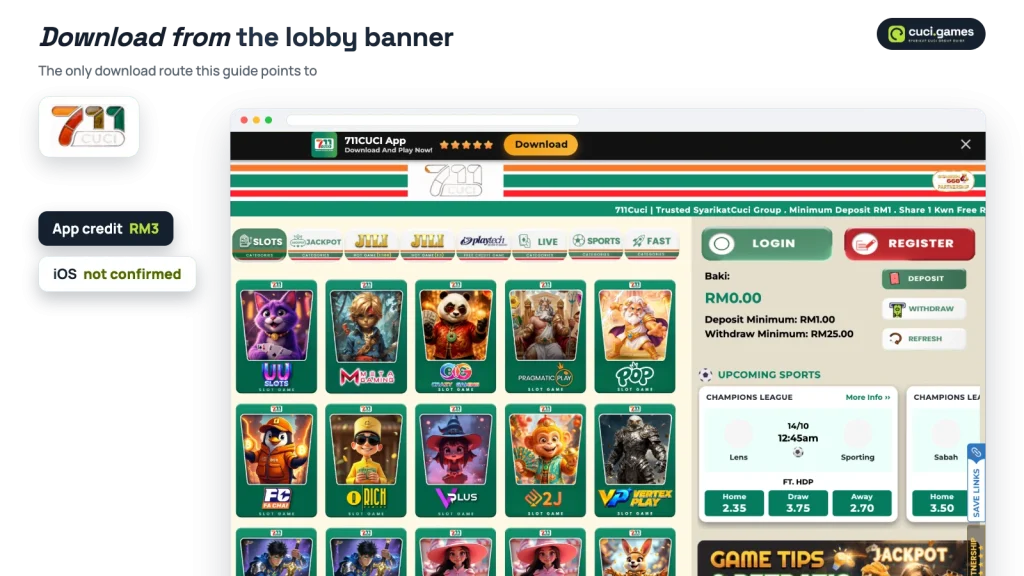
There are two entry points inside the lobby, and both belong to the brand. The first is the banner across the top of the home screen, which reads 711CUCI App, Download And Play Now and carries a Download button. The second is the Download App item in the side menu, under the same list that holds VIP Ranking, Downline, Bonus and Announcement.
Nine brands in the group run on the same lobby layout, so this banner looks familiar from brand to brand. What changes is the name on it and the credit attached to it.
Reach the brand by its name and open it from the button on this page. Addresses with extra words tacked on the end are not part of this guide, and an app handed out by one of them is not the brand’s own file.
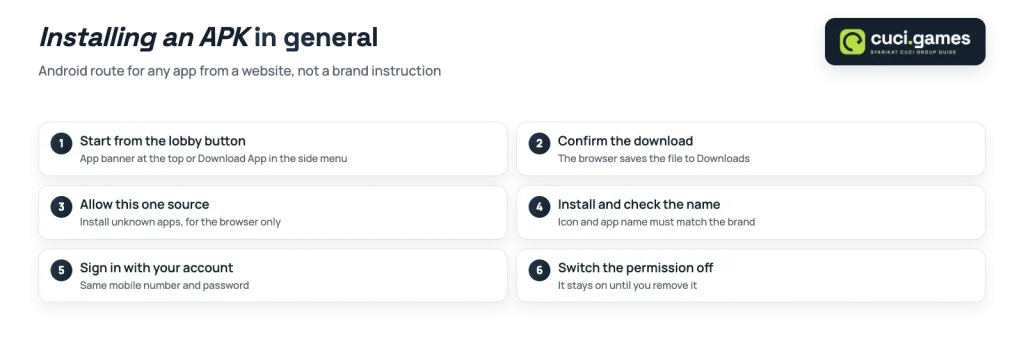
The install route below is how Android handles any app that comes from a website rather than from the Play Store. It is described in general terms, because file names, sizes and version numbers are not published on the banner itself.
Before you continue
An APK file posted anywhere other than the brand’s own lobby button is not a verified download.
An Android installer is a package of code, and the icon inside it proves nothing about what else it contains. A repackaged file can ask for permissions the original never needed, such as reading your SMS messages, which is the same channel the registration form uses to send a verification code.
There is a second problem that has nothing to do with malware. A copy hosted elsewhere is a snapshot, frozen at whatever version was uploaded. Lobby promotions change often, and an outdated build can leave you looking at a screen the operator has already replaced.
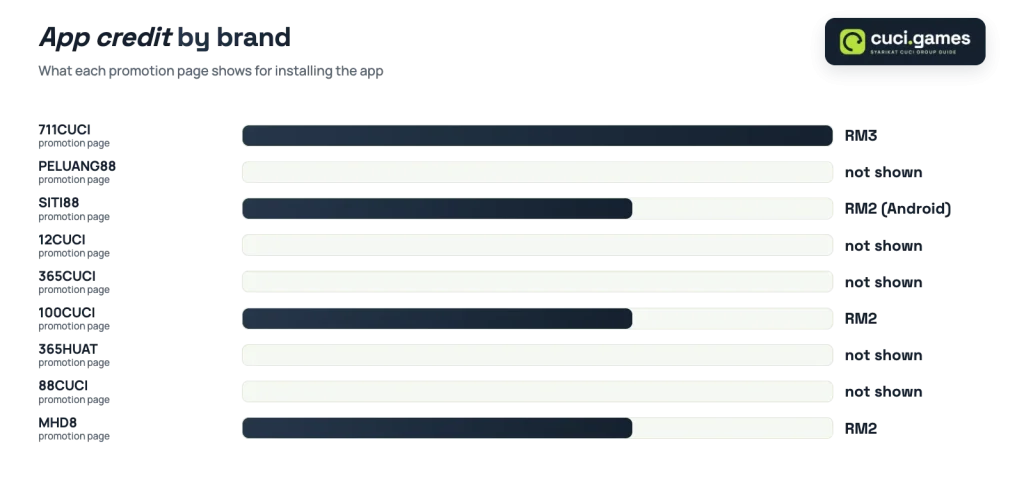
The app credit is a promotion card, not an automatic reward. It appears on the promotion page as Download App Free, with RM3 shown as its value. Four brands in the group display a card of this type, and the amounts differ:
| Brand | App credit card displayed |
|---|---|
| 711CUCI | RM3, Download App Free |
| 100CUCI | RM2, Free Credit 365 App |
| SITI88 | RM2, Free Credit Android App |
| MHD8 | RM2, App 365 Free, All Slot |
| 12CUCI, 365CUCI, 88CUCI, PELUANG88, 365HUAT | No app credit card shown on the promotion page |
The credit is the part that varies between brands. If you want the brand-by-brand picture of app credits across the group, including which lobbies show nothing for installing, that comparison is kept separately.
What the card does not print is its fine print. The terms open inside the claim flow rather than on the card face, so no turnover figure or cash-out limit is visible from the promotion page. In general, across Malaysian lobbies, free credit of this size carries both. Read the claim screen first, and treat the RM3 as a small trial balance rather than as withdrawable cash.
Promotion values also move. The group comparison table carries the date on which each figure was checked, which is the version to trust over any amount quoted in a listing elsewhere.
An app of this kind is a front end to the same account you already hold. The mobile number and password from registration continue to work, and the Forgot Password link sits in the same place as it does in the browser. Nothing needs to be registered twice because of the install.
Registration itself stays per brand, though. The side menu links out to the other nine names in the group, and opening one of them means filling in the form again: full name matching your bank name, mobile number, password and the optional referral field, confirmed with a code sent by SMS. If you want the rest of that brand’s lobby, promotion page and cashier in one place, the full brand guide covers it.
Once you are in, the balance panel behaves as it does on the web lobby, with Minimum Deposit RM1.00 and Minimum Withdrawal RM25.00 displayed on it. The RM25 floor is the one to plan around, because a small bonus balance cannot be cashed out below it.
An iOS build is not confirmed for this brand. On an iPhone the practical route is the mobile browser. The bottom bar with Home, History, Bonus, Live Chat and Setting works the same way in a browser tab, and so does the promotion page where the app card sits.
An iPhone user keeps the same account and loses only the home-screen icon. Treat any iOS file offered on a third-party listing with the same caution as a reposted APK.
The app banner and the Download App menu item both live inside the lobby, so the download and the RM3 card start from the same place.
