
Nine of the ten Syarikat Cuci brands run on the same lobby platform, and every one of them puts an app banner across the top of the home screen: the brand name followed by App, the line Download And Play Now, and a Download button. The same route appears again in the side menu as Download App. Finding the download is the easy part.
What differs between the brands is whether installing the app comes with a credit, and how much the lobby tells you about the file before you tap. This page puts the app credits side by side, walks through the general Android route, and sets out the one iOS option documented anywhere in the group.
On the shared platform the app banner is the first thing under the header, above the game category tabs. Tap it and you are on the brand’s own download route. If you have already scrolled past it, the side menu repeats the option as Download App, in the same list that holds Bonus, History, Downline, Announcement and the Syarikat Cuci Free brand list.
Two things are missing. No file size, version number or install walkthrough is shown beside the button, and nothing beside it states whether an iPhone build exists. So the button tells you where the file comes from, which is the part that matters most, but not what you are getting.
OKCUCI works differently. It runs on a separate platform with a desktop-style top menu, and its download block is explicit about both systems.
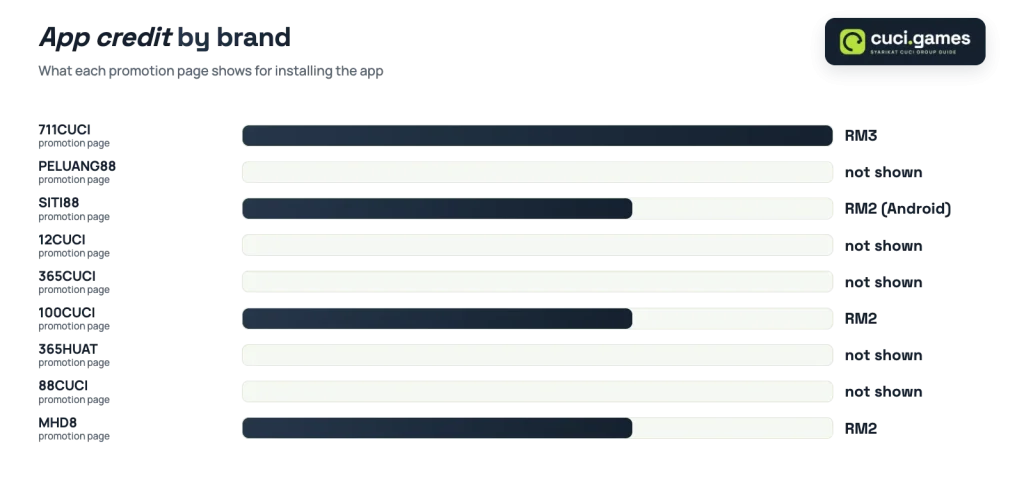
Four brands attach a credit to the install, each on its own promotion page. The values are small and they are promotions, not a property of the software.
| Brand | App credit shown | Where it appears |
|---|---|---|
| 711CUCI | RM3 | Download App Free card |
| 100CUCI | RM2 | Free Credit 365 App card |
| SITI88 | RM2 | Free Credit 365 Android App card |
| MHD8 | RM2 | App 365 Free card, tagged All Slot |
At RM3, 711CUCI sits a ringgit above the other three, and its card is framed around the download itself rather than a 365-day cycle. There is more on that card and its banner in a closer look at its app credit.
The remaining five shared-platform lobbies display the app banner but show no app credit card on their promotion pages. That is not a reason to skip the app if you want it; it simply means the install earns nothing extra. For one of them, its app banner and install route is covered in its own right.
Each of these cards opens a claim flow rather than stating its conditions on the tile. As a rule across Malaysian lobbies, free credit of this size carries a turnover target and a ceiling on what can be withdrawn from it, and the card’s own terms are what decide. Promotion values also move, which is why the comparison table in this guide carries the date each offer was checked.
Before you continue
An APK posted on a forum, a file-sharing site or a chat group is not the brand’s download, however convincing the icon and the file name look. A repackaged casino APK can ask for permissions the real one never needed, and you would have no way to tell. Use the Download button inside the lobby, or nothing.
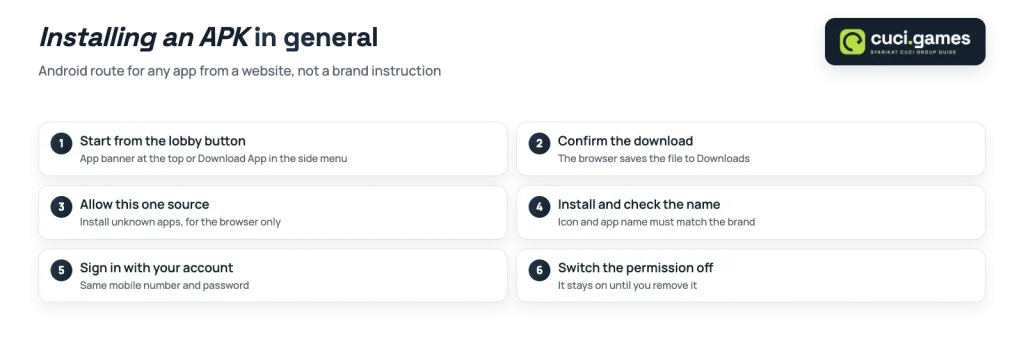
Android allows apps from outside the Play Store, which is why these lobbies can hand you a file directly. The permission that makes it possible is the same one that makes a bad file dangerous, so the discipline is about the source, not the steps.
In general, a sideloaded Android install runs like this.
Two practical points follow from that. First, your phone will warn you during the install, and that warning is ordinary rather than a sign something went wrong. Second, if an install fails or an app stops opening, go back to the lobby button for the file again rather than searching for a copy of it elsewhere.
OKCUCI publishes both options in its download block, Muat Turun App: an iOS Lite-App button and an Android APP button, described by the brand as one app covering sports, e-sports, live casino, lottery and electronic games. That makes it the only brand in the group with a stated iPhone path, and the iOS and Android buttons sit side by side on its home screen.
For the nine shared-platform brands, nothing beside the download banner says whether an iOS build exists. Treat it as unknown rather than available. If you are on an iPhone, the sensible move is to use the brand’s lobby in your mobile browser, which carries the same category tabs, balance panel and bottom bar as the home screen you already know.
Every brand in the group keeps its own membership. You register on each one separately, with your full name as it appears on your bank account, a mobile number, a password and an SMS code, and an optional referral field. There is no group-wide login, no shared wallet and no shared balance, so the app you install signs you in to that brand and that brand only. The full walkthrough is in the registration form field by field.
On the shared platform the balance panel also sets the money boundaries you will meet first: Minimum Deposit RM1.00 and Minimum Withdrawal RM25.00. The RM25 floor matters most here, because a small app credit on its own does not reach it. You need the credit to grow past RM25, under whatever conditions the card sets, before a withdrawal is possible at all.
A last word on what an app is here. It is a front end for the same lobby, so the reason to install one is convenience and, on four brands, a few ringgit of credit. Anything promising more than that, from a different source, is not the brand’s download.
